
Free shadowing for any YouTube video
Say it with the speaker.
Sada is a free website for shadowing any captioned YouTube video: practise one line at a time, record yourself and compare your words and timing with the original speaker. No account, no paid plan.
Your first sentence · Repeat mode “You don't need to speak fast.” The line is already selected. Listen first, then record your voice. Try this sentence- Free
- No account
- No extension
- Recordings stay on your device
The method
Shadowing means copying a real speaker, straight away.
Listen to a line and say it along with the speaker, or right after: the words, the rhythm, the pauses. It trains your ear and your mouth together.
The trouble is, on your own you can’t tell how close you got. Sada listens and tells you.
What shadowing is, and how to do it step by step
Listen-and-repeat practice with real sentences, short to long
Em português: guias de inglês para brasileiros
SpeakerYouA demonstration, not your voice.
How it works
Three steps, then again tomorrow.
-
1
Paste a link
Any YouTube video with captions, or pick a famous talk. Sada splits it into short lines from the captions. It plays from YouTube; Sada never downloads it.
-
2
Shadow it, line by line
Shadow mode: speak at the same time as the speaker. Repeat mode: hear the line, then say it in the silence after. Slow it to 0.75× and loop a hard line.
-
3
Compare, and keep going
See which words were heard, which you missed, and how far behind the speaker you were. Then play your take next to the original.
Your score
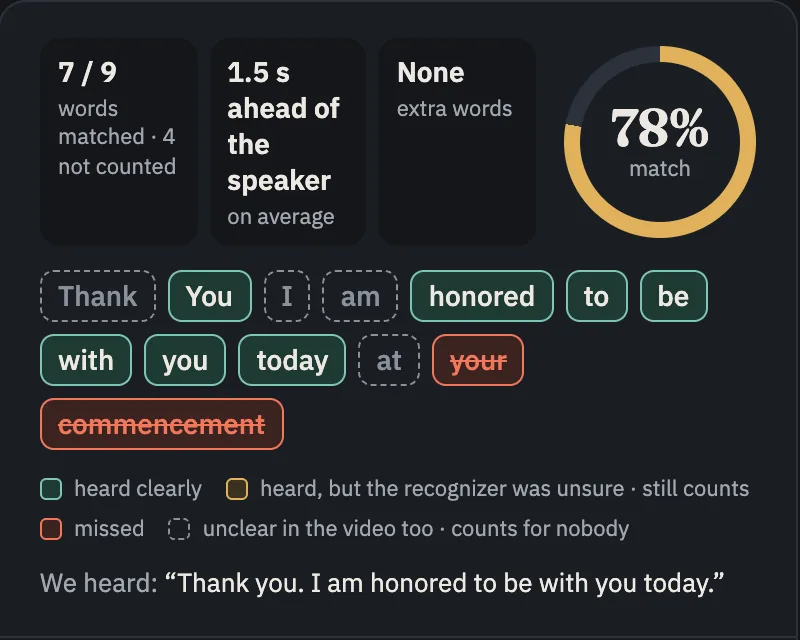
An honest score, word by word.
Green was heard, red was missed, and dotted words are unclear in the video itself, so they count for nobody.
Which of your words were heard, which you missed, and how many seconds behind the speaker you were.
Each individual sound, or your accent. You judge that by ear, with your take next to the original.
An example on a line from Steve Jobs’ Stanford speech, not a user’s result.
Missed a word?
Ask the coach.
After a take, tap Ask the coach for one short tip on the word that slipped, in your language. The tip is written by AI from the words your phone heard. Your voice never leaves your device.
- Only when you tap. Nothing pops up by itself.
- 3 tips a day free. Sign in for 30 a day and your progress on every device.
- Practice never needs an account. Still free, still no ads.
Can I borrow your pen?
Your phone heard “pour”, not “borrow”. Start strong, then make the ending light:
BOR-roh
Ready to practise
Start with a talk you already know.
Or paste any link. These open straight into practice.
or bring your own video
Private by design
Your voice stays with you.
- Recognised on your device
Speech recognition runs in your browser. Your recordings are never uploaded.
- Saved in your browser
Your takes stay in this browser. Delete any take with one click.
- No account needed, no card, no extension
Practise without signing up or installing anything. A free account is optional.
- One download, once
The first visit downloads the speech model once (about 250 MB), so use Wi‑Fi.
Languages
Any language with captions.
Sada works with any YouTube video that has captions. It has been tested well in these six:

- English
- Deutsch
- Português
- Español
- Italiano
- Français
The interface is in English, Arabic, Vietnamese, Brazilian Portuguese, Russian, Japanese, Korean, Italian, French or German.
Price
Free.No account needed.
- No card, no trial, nothing to cancel
- Works in the browser on phones and computers
- Recordings stay on your device
Questions
Before you start.
Do I have to turn on my camera?
No. Voice only is the default, and every feature works without the camera.
Which videos work?
Any public YouTube video with captions, written by the creator or made by YouTube automatically. Without captions there are no lines to practise.
Does my voice leave my device?
No. Speech recognition runs in your browser. The first visit downloads the speech model once; after that it works from your browser’s cache.
Does Sada grade my accent?
No. Sada shows which of your words came across and how far behind the speaker you were. You judge the accent by ear, with your take next to the original.
Does it work on my phone?
Yes, in the browser on iPhone and Android, and on computers. No app store and no download.
What does it cost?
Nothing.
Practise again tomorrow? Get one short sentence a day, ready to record in one tap.
You don't need to speak fast.
A slow line to begin with: listen to how “don’t need to” runs together, then say it at the speaker’s pace.
Free · One email a day · Unsubscribe anytime. Confirm your email to start. We keep only your email, language, time zone and where you signed up.
Pick a video you love. Start with one line.
No account, no download, and no camera unless you want one.